


Raynet One 2026.4: Autonomes Endpoint Management, Raynet One Agent, and SaaS Management
Date: November 3, 2026
What’s new on Raynet One?
Raynet One continues to evolve, and 2026.4 brings insight and action closer together than ever. Security and IT teams can now find vulnerable software, prioritize it by real-world exploitation, and patch it by talking to Raynée, supported by the new Raynet One Agent. The release also makes Microsoft 365 a native data source for SaaS Management, gives you more control over data quality, and extends License Management to reflect how enterprise agreements are actually structured.
The following feature highlights are now available with Raynet One 2026.4:
Autonomous Endpoint Management with Raynée
Endpoint Management now runs through Raynée, the same AI chat used for asset and license questions. Instead of working through the classic interface step by step, you simply ask in plain language.
Ask “show me the top vulnerabilities in my environment,” then follow up with “download a patch for this” and “deploy it.” Raynée takes care of the download, package validation, device targeting, and rollout. It always asks for your confirmation before changing anything on a device.
Notifications with built-in actions
New vulnerabilities, patches, and software trigger notifications in the Action Center, each with a ready-to-use action. For example, it can tell you that updating Sumatra PDF on 21 devices lowers their vulnerability score from 7.8 to zero.
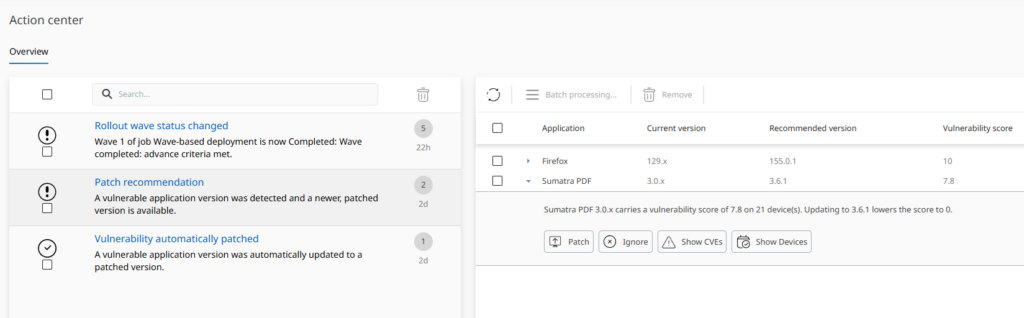
The Action Center suggests a fix and shows how much it lowers the vulnerability score
Safe, staged rollouts
Patches roll out in stages instead of reaching every device at once. A pilot group receives them first, and the rest of the fleet follows once a success threshold is met. If failures exceed a set limit, the rollout stops automatically, so a faulty patch affects only a handful of devices. You can also tune the wave strategy with fixed pilot devices, random sampling, or percentage-based expansion.

A staged rollout moves from a pilot group to the rest of the fleet
Note: This capability is rolling out to early-access customers first. Broader availability will follow.
Stronger Vulnerability Management and Technology Catalog enrichment
Data Enrichment from Raynet One Technology Catalog now delivers more security, governance, and lifecycle data.
Prioritize what’s actually exploited
CISA KEV and EPSS scores now appear alongside CVSS, so you can focus on vulnerabilities that are actively exploited. Raynée can use this data too. Device details now also list the vulnerabilities that affect each device.

Raynée ranks the top vulnerabilities using CISA KEV, CVSS, and EPSS data
Know where your software comes from
New attributes show each product’s country of origin, export control classification (ECCN), open-source status, and whether AI is built in. Together, they give you a basis for digital sovereignty and AI governance decisions across your estate.
Lifecycle and hardware data
- End-of-Life status now separates unknown dates from implied ones and drives IT Visibility dashboards, so you can trace an at-risk device back to the products behind it.
- CPUs, GPUs, and enclosures are now normalized and enriched just like software.
The new Raynet One Agent
Raynet One now has its own lightweight agent, built on .NET. It complements Zero-Touch scanning with faster, deeper inventory. It can also run tasks such as package installation, patching, and command execution directly on the device.
- Uses the same instruments and plugins as Zero-Touch scanning, so all inventory data lands in the same data model.
- Keeps inventory results while a device is offline and uploads them at the next connection.
- Tracks every task in Raynet One with progress and logs, so you can follow a deployment from start to finish.
- Provides secure enrollment through named tokens with an expiry date and a usage limit. Configuration changes reach agents without a reinstall.
- Runs on Windows (x64 and ARM64), macOS, and Linux with native installer packages, all available from one central downloads page.

Managed devices running the Raynet One Agent
Smarter AI chat with visible reasoning
Raynée now works like a team of specialists. Questions about assets, license entitlements, or endpoint management go to a dedicated expert, and a separate expert handles direct data lookups. For a multi-part question such as “which devices are out of compliance and which contracts cover them,” Raynée plans the steps and draws on the right expert for each part.
- Visible reasoning shows the plan and the areas Raynée checks, so you can follow and challenge the logic behind compliance and licensing answers.
- An upgraded AI model improves answers to complex requests that span several steps or product areas.

The new Raynée view with visible reasoning and an artifact panel
SaaS Management and unified integrations
Microsoft 365 as a native data source
Microsoft 365 is often an organization’s largest license line item, spread across EA subscriptions, E3 and E5 plans, and add-ons such as Copilot or Defender. It is now a native connector in Raynet One. A new view under Cloud + SaaS shows each license’s allocation, status, and assigned accounts. Usage activity from sign-ins, mailboxes, Teams, and OneDrive comes in as well. All of this flows into a generic SaaS data model that future connectors will share.

Microsoft 365 licenses in Cloud + SaaS, with allocation, status, and assigned accounts
New native connectors
Raynet One also adds native connectors for Adobe Admin Console, Microsoft Intune, Microsoft Defender, Cisco Meraki, Jamf Pro, Jamf School, Nutanix Prism, and Prisma Cloud. Some are in preview and can be turned on with a dedicated switch.
All integrations in one place
Every integration, new or existing, now lives under Configuration → Connections. A setup wizard and connection tests make it easy to add a new one. For each integration, you can see when it last ran, whether the run succeeded, and what it imported. When you remove an integration, you can also delete the data it imported, so no orphaned devices or accounts remain.

Your integrations in one place, with data types and last sync time
Data quality you can control
Deduplication and reconciliation
Deduplication and reconciliation settings, previously available only in Data Hub by Raynet One, are now part of Raynet One. Choose a detection strategy (Broad, Standard, Precise, or Custom) and set source priority for each data category by drag and drop. For example, you can rank Raynet One above Active Directory when Active Directory overwrites a correct hostname. The reconciliation trace shows where each value came from and which rule decided it, and you can return to Raynet’s recommended order at any time.

Decide which sources matter most with simple drag and drop
Inventory health
Outdated inventory data can quietly distort license positions, vulnerability exposure, and asset counts. You can now define up to five health statuses, such as Current, Expiring, and Obsolete, each with its own age threshold and color. The statuses appear as tags in the Devices list and in the IT Visibility Gap Identification dashboard, so you can spot stale data before it affects a report.

Set your own age thresholds and colors for each inventory health status
Native SNMP device discovery
SNMP discovery is now built into Raynet One. Network gear, printers, and other SNMP-only devices appear in the same unified inventory as every other device.
- SNMP joins the Zero-Touch Windows and Unix instruments in one list that you can enable, disable, and reorder. By default, it runs last as a fallback for devices that can’t be reached any other way.
- A new credential type covers community strings as well as SNMP v3 authentication and privacy settings.
- Existing OID-to-vendor rules from RayVentory carry over, so you keep the device detection you already rely on.

Data from multiple sources, including SNMP, merged into one device list
Contract and License Management built around real agreements
An enterprise agreement is rarely a single document. Raynet One 2026.4 now captures its full structure, so special conditions no longer get lost in attachments.
Purchases, agreements, and linked documents
The Documents screen now separates Purchases and Agreements, each with its own data model. You can link Purchase Orders, Supplements, and supporting documents, and AI suggests relationships. These links feed directly into compliance calculations. Contract items also support discounts as a percentage or a fixed amount, and totals are calculated automatically.

The relationships between contracts and documents at a glance
New license metrics and plain-text rules
A new Company-based metric covers licenses calculated per legal entity. When the Contract Analyzer can’t identify a metric with confidence, it assigns a custom metric instead of guessing. You can also describe a licensing rule in plain text, such as “build machines are license-free,” and Raynet One turns it into a formula you can review. Rules can build on curated License Codex data and be updated when license terms change.

A licensing rule written in plain text, turned into a formula you can review
Focus View and a License Manager role
Focus View narrows the Calendar, Entitlements, Compliance, and Documents views to one contract, product, or vendor at once, and a single toggle brings back the full view. A new License Manager role keeps each team’s license data separate.

Focus View narrows your license workspace to the scope you choose
More highlights
- Multilingual interface: Raynet One is now available in German, French, and Turkish.
- New configuration layout: Settings are grouped into clear sections, and License Management and Endpoint Management have their own menu entries.
- Smarter data grids: A KPI panel with quick filters, plus end-of-life filtering with plain terms such as “expires in the next quarter.”
- Technical and commercial products, side by side: A dedicated Products page separates what was discovered from what the contract refers to. This makes it easier to match licenses to installations.
- Easier document review: Purchase documents and the data extracted from them now appear side by side on one screen, so you can check them without constant scfrolling and zooming.
- Device affiliation: Device details now show each device’s Resource Group and Organization Unit, so ownership and authorization context are always visible.
Have fun exploring the new features!
Raynet One 2026.4 brings automated endpoint actions, a native agent, dedicated SaaS Management, and License Management that reflects how real agreements work. Teams can move from insight to action faster, all within a single platform.
This post covers the highlights. For every new feature and improvement in Raynet One 2026.4, read the full release notes.